|
2
|
Right-click on the file and select Open With > Microsoft Office Excel.
|
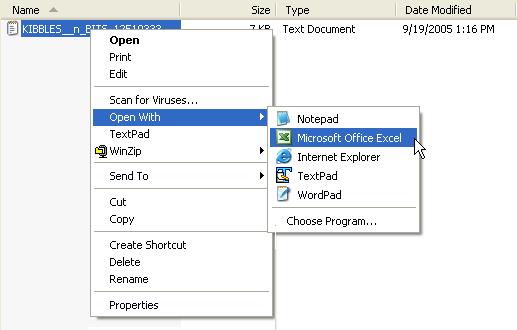
The downloaded data displays in Excel, but each line of data is stored in the first column.
|
3
|
Select the first column (A) by clicking on the A column heading.
|
|
4
|
From the Data menu, select Text to Columns. MS Excel’s Text Import Wizard - Step 1 of 3 window opens.
|
Continue with Step 5 in the section, “Using the MS Excel Text Import Wizard” , and complete the remaining steps in that section. They will guide you through Excel’s Text Import Wizard until the downloaded data displays in Excel.
 OpenText Active Catalogue Browser Interface User Guide for Vendors PDF
